
Documentation
idealista for ChatGPT
1. About
idealista provides an official app for ChatGPT that lets you search real estate listings and get information from idealista directly inside your conversation. It is only available through the official idealista app, and it does not support manual configuration from other MCP clients.
2. Availability and languages
- Countries: Spain, Italy, and Portugal.
- Languages: Spanish, English, Italian, and Portuguese.
The language of your conversation can be different from the country where you are searching for properties.
3. How to use idealista in ChatGPT
- Open the Plugins Directory, find idealista, and select Connect.
- Write your request using natural language.
Once connected, invoke idealista with @idealista or select it from the
tools menu. ChatGPT will choose the appropriate idealista tool for your
request — you don’t need to know its tool names or provide any technical
parameters.
For general instructions on connecting plugins in ChatGPT, see Plugins in ChatGPT and Codex.
4. What you can do
- Search for properties on idealista. Results are shown as a browsable carousel, which you can expand into a map view to see listings by location.
- The results carousel and map view work on mobile and desktop, and support both light and dark mode.
- Ask idealista to sort results — for example, “the cheapest first” or “the most recent first” — using the same sorting options already available on idealista’s website. If you don’t ask for a specific order, results are sorted by relevance.
- Search results and listing details always reflect the information currently published on idealista.
- Get information about a specific listing directly, by giving its idealista URL or listing ID — no search needed. You can also ask about one of the properties from your search results or from the map view.
- Get help with tasks on idealista’s website, based on its help content — currently, how to publish a listing. The app can explain how to publish a listing, but it cannot publish one on your behalf.
- Learn about the app’s capabilities and how to get started.
5. Available tools
| Tool | Purpose |
|---|---|
search_properties |
Searches for properties on idealista. |
property_detail |
Retrieves information about a specific idealista listing. |
get_howto |
Explains how to complete tasks on idealista’s website, based on its help content (currently: how to publish a listing). |
guide_idealista_chatgpt |
Explains what the idealista app can do in ChatGPT and how to get started. |
6. How search results are displayed
You can search in any of the available languages, regardless of the country: the country is determined by the location you mention, not by the language of your prompt. Results always follow the same flow — inline carousel, map view, listing detail — illustrated below with prompts in different languages.
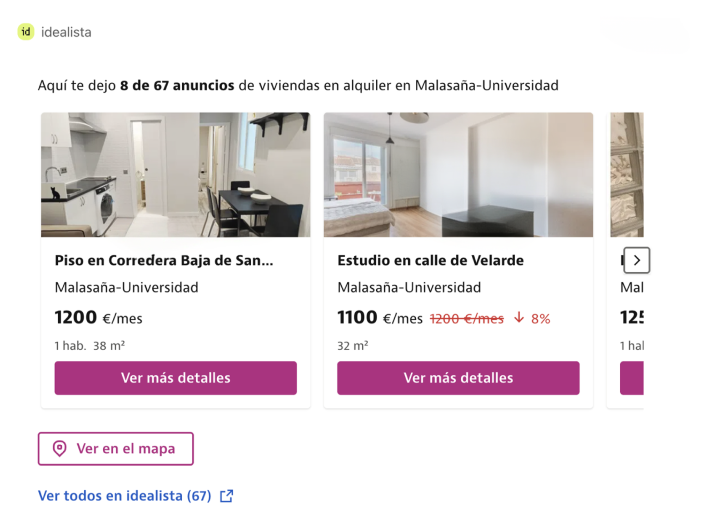
Inline carousel. Search results first appear as a carousel with price, size, rooms, and features for each result, plus a link to see the full search on idealista. For example, in Spanish:
“@idealista busca viviendas en alquiler en Malasaña-Universidad, Madrid.”
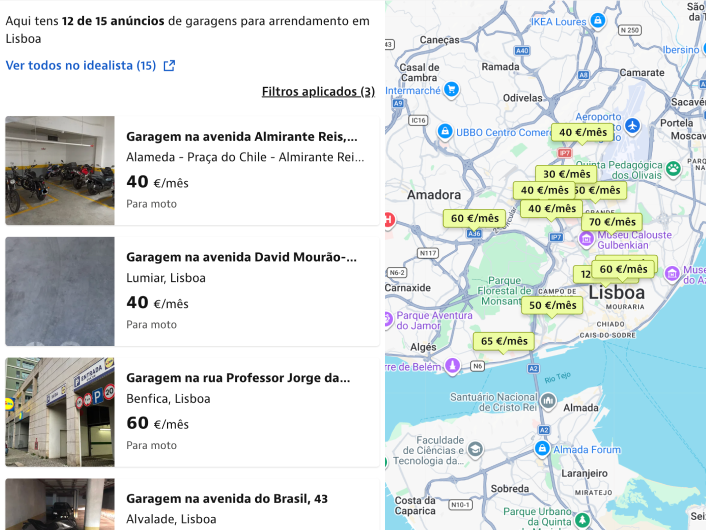
Map and list view. Selecting “view on map” expands the carousel into a split view, with the list on one side and the locations on a map on the other. For example, in Portuguese:
“@idealista procura garagens para arrendar em Lisboa.”
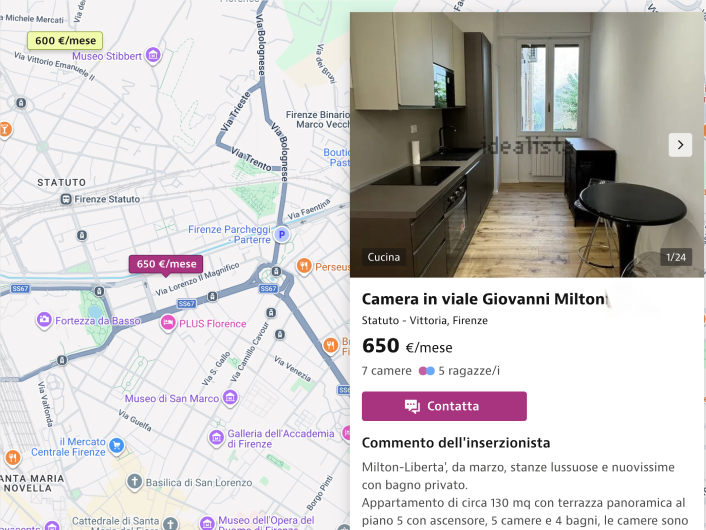
Listing detail. Selecting a listing — or asking about one of the results — opens its detail with price, size, rooms, features, images, location, and status, without starting a new search. For example, in Italian:
“@idealista mostrami i dettagli della camera in viale Giovanni Milton tra i risultati.”
7. Example prompts
Example 1 - Search and refine results
User prompt:
“@idealista I’m looking for a 2-bedroom apartment to rent in Rome for less than 2,000 euros a month.”
How ChatGPT responds:
- ChatGPT searches idealista for matching rental apartments in Rome.
- Returns an inline carousel with price, size, rooms, and features for each result, which you can expand into a map view.
- Includes a link to see the full search on idealista.
You can ask follow-up questions such as:
“Show me the cheapest ones first.” “Show only the ones with a garden.” “Tell me more about the second one.”
If you ask for a specific order — for example, “the cheapest first” or “the most recent first” — idealista sorts results using the same options already available on its website. Without a sorting request, results are sorted by relevance.
Expected behavior
You receive matching rental listings that you can browse as a carousel or on a map, and refine further — including by sorting — with follow-up questions.
Example 2 - Get details about a specific listing
User prompt:
“@idealista summarize the strengths and weaknesses of this listing: https://www.idealista.com/immobile/12345678/”
How ChatGPT responds:
- ChatGPT retrieves the current details of that listing from idealista — price, size, rooms, features, images, location, and status.
- Summarizes its strengths and weaknesses based on that information, without starting a new search.
Expected behavior
You receive a summary based on the listing’s real, current information.
Example 3 - Get help with a task on idealista’s website
User prompt:
“@idealista how do I publish a listing?”
How ChatGPT responds:
- ChatGPT returns a step-by-step guide based on idealista’s help content, including prerequisites and related links.
Expected behavior
You get an explanation of how to publish a listing; idealista does not publish anything on your behalf.
Example 4 - Learn what idealista can do
User prompt:
“@idealista what can you help me with?”
How ChatGPT responds:
- ChatGPT explains the idealista app’s capabilities and how to get started.
Expected behavior
You receive an overview of what you can do, without idealista taking any action.
Example 5 - Location is missing or too vague
User prompt:
“@idealista I’m looking for a home 5 minutes from my house.”
How ChatGPT responds:
- idealista asks you to specify a concrete location — a city, neighborhood, or address — since it can’t search based on your current location.
Expected behavior
ChatGPT asks a clarifying question instead of returning results.
8. Permissions and limitations
- All tools are read-only.
- No login or idealista account linking is required.
- The app does not publish, edit, or delete listings.
- The app does not manage favorites, alerts, or messages.
- The app does not perform any transactions.